TISTA / UCM NextGen
Restructuring complex case management around how people actually work
UCM NextGen reimagined how contractors working with the Centers for Medicare & Medicaid Services (CMS) investigate complex cases of fraud, waste and abuse. The challenge was to bring fragmented workflows, records and collaboration into one coherent case-management experience.
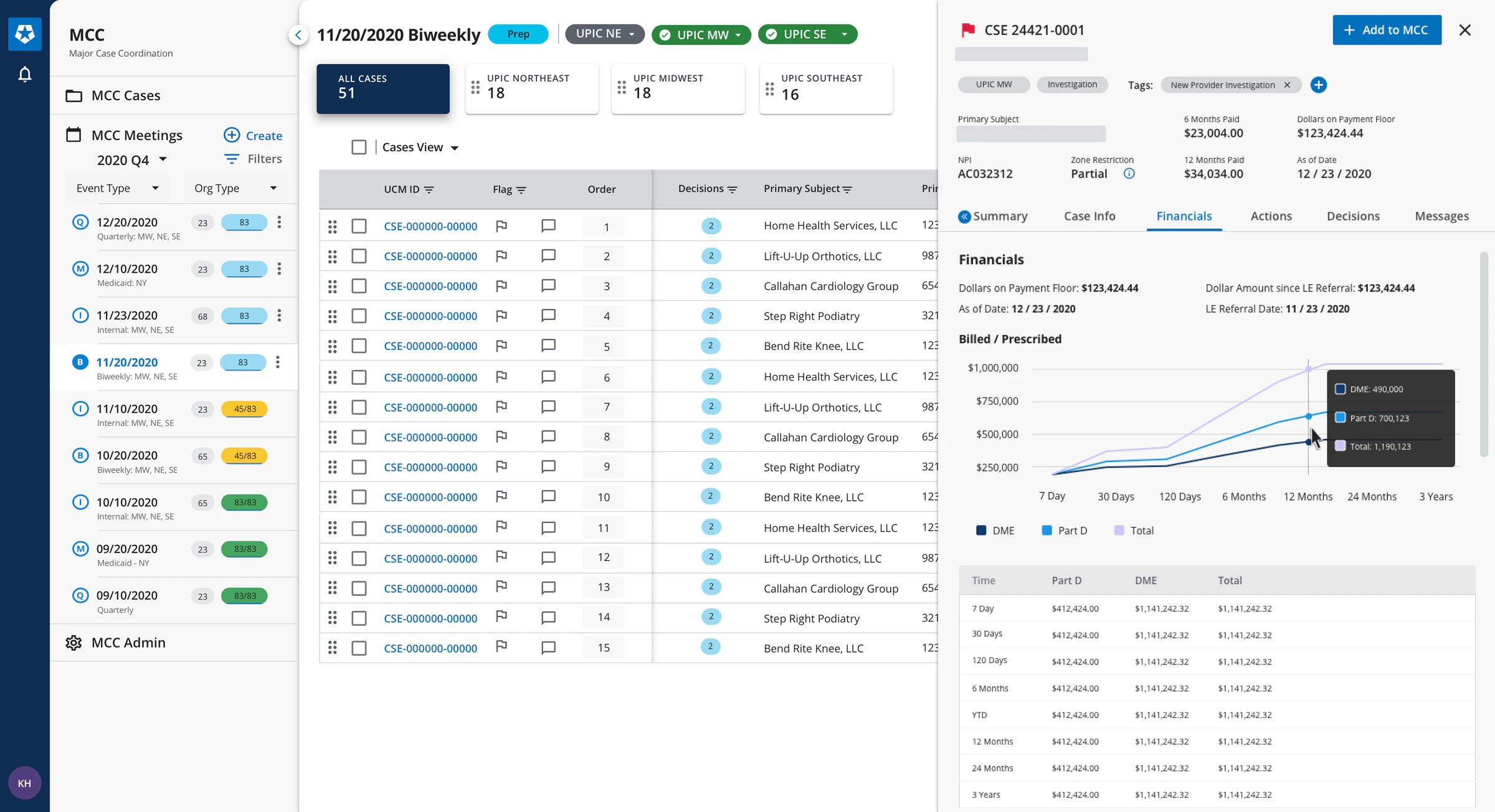
Major Case Coordination with the Quick-View drawer open on a case’s financials.
- My Role
- UX Designer
- Company
- TISTA Technologies
- Client
- Centers for Medicare & Medicaid Services (CMS)
- Timeline
- 2020–2021
- Deliverables
- UX Research · UX Architecture · System UI Design
My contribution
- Team
- Part of the project’s six-person human-centred design team.
- What I designed
- The Quick-View Actions drawer for Major Case Coordination, across its pre-meeting, in-meeting and post-meeting states.
- With the team
- Weekly design sprints: system architecture, ideation, wireframing and critique, with regular stakeholder reviews.
- Discovery research, the experience maps and the record model were team work.
01The problem
A case passed from person to person — and out of the system
An investigation moves from lead to vetting and investigation — for the top cases, major case coordination — and on to administrative action. Each stage belongs to different people.
How might we
How might we create a multi-faceted tool for our partners to mitigate fraud, waste and abuse of Medicare & Medicaid?
What made it complex
Records spawn records
Each case spawns related records — information requests, medical reviews, payment suspensions — each with its own workflow.
Many roles, two sides
Analysts and supervisors at the contractors; reviewers and coordinators at CMS.
Work outside the tool
Moving a case meant email, tracker spreadsheets and shared drives alongside UCM.
Records out of sight
Records froze while another team held them, and once closed could only be found by search.
Current-state experience map
The team traced one case, from a Proactive Data Project (PDP) lead to a payment suspension, to show every tool in play.
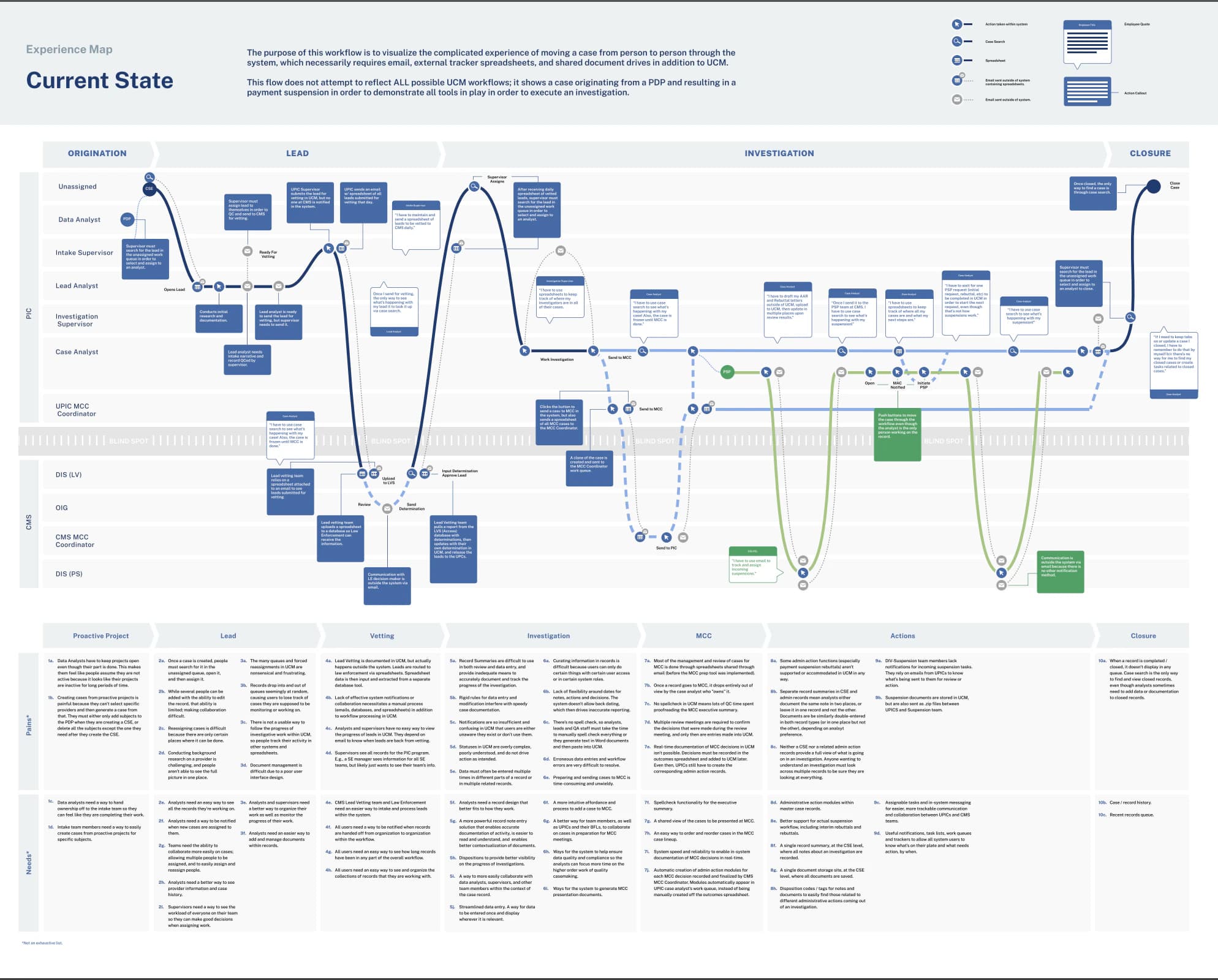
What to look for
Each lane is a role: contractor roles above the grey “blind spot” band, CMS teams below.
Envelope and grid icons mark where the case left UCM for email and spreadsheets.
Pains and needs are numbered by stage along the bottom; the list isn’t exhaustive.
9 terms
- CMS
- Centers for Medicare & Medicaid Services.
- UPIC
- Unified Program Integrity Contractor, which investigates potential fraud, waste and abuse.
- CPI
- CMS’s Center for Program Integrity.
- CSE
- The UCM case record at the centre of an investigation.
- PDP
- Proactive Data Project, a data-driven source of leads.
- PSP
- Payment Suspension record.
- CNR
- Compromised Number Record.
- MCC
- Major Case Coordination.
- PPR
- Postpay Review record.
02Discovery
Understanding how the work actually happened
The team set out to model the existing system: how each role’s responsibilities fit together, and how records changed hands during their lifecycle.
Team research scope
- User interviews and stakeholder immersion sessions
- 79
- Organizations
- 11
- Discovery phase
- approximately 12 weeks
Mental model · UPIC Intake Analyst
One of the team’s role-by-role mental models: the intake analyst at a Unified Program Integrity Contractor (UPIC), who triages complaints and turns them into leads.
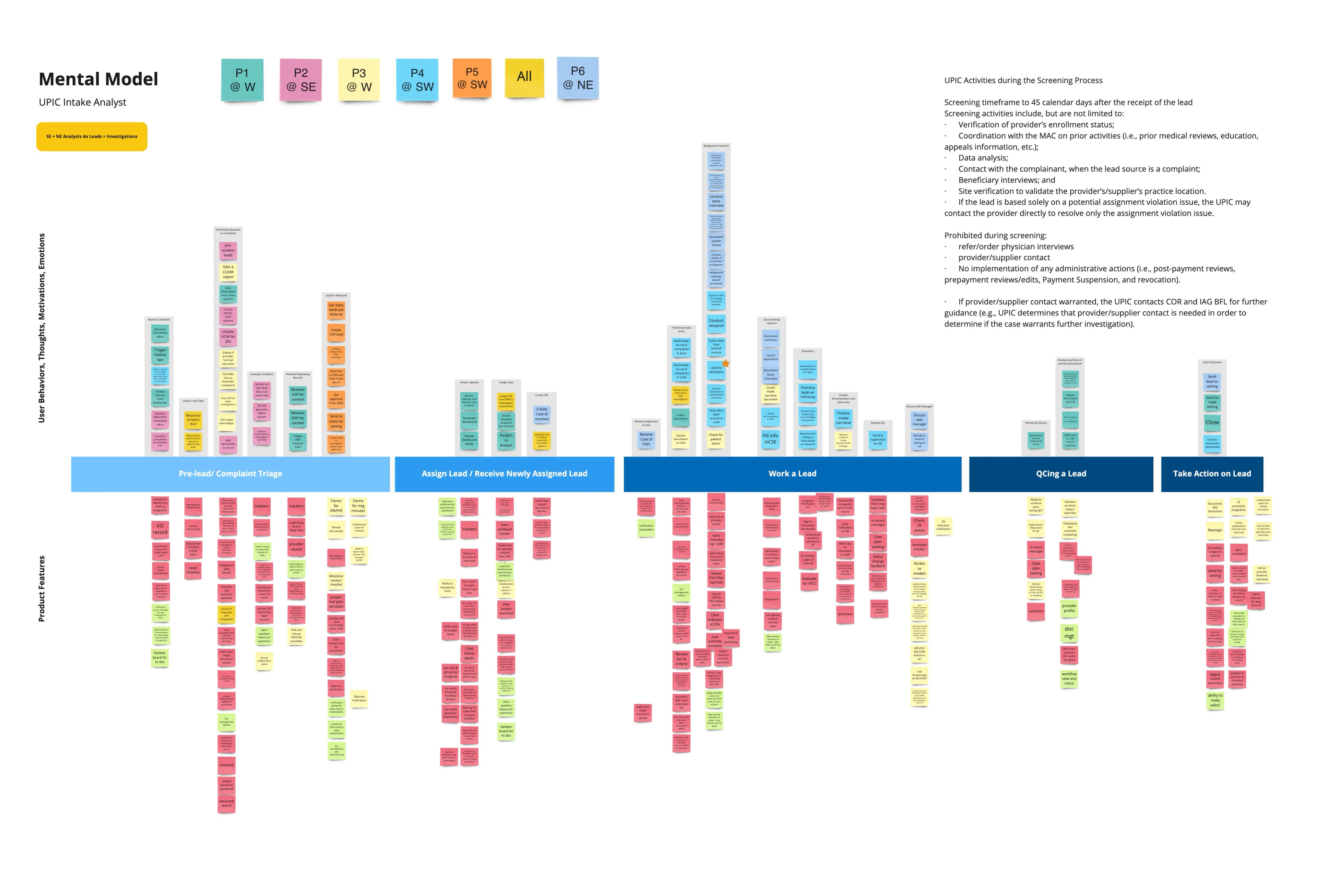
How to read it
Columns follow the work, from complaint triage to taking action.
Notes above the line are behaviours, thoughts and emotions; below it, product features.
Each colour is one participant. Participant names have been removed.
Records spawn records
Every investigation centres on a UCM case (CSE), from which analysts spawn related records — about 20 types, flowing in from three primary pipelines.
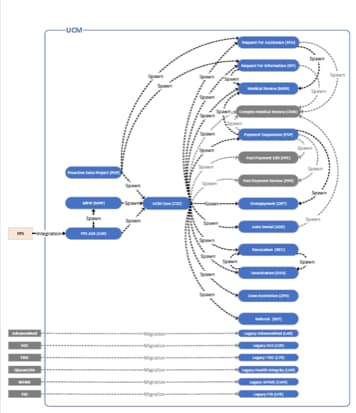
Transcribed from the team’s low-resolution hierarchy diagram. Labels that can’t be read reliably are left out.
Intake
- Proactive Data Project (PDP)
- Two further primary pipelines
- Six legacy systems, migrated
UCM case (CSE)
The parent record for an investigation.
Spawned records
- Request for Assistance
- Request for Information
- Medical Review
- Complex Medical Review
- Payment Suspension (PSP)
- Postpay Review (PPR)
- Overpayment
- Auto Denial
- Revocation
- Deactivation
- Zone Restriction
- Referral
Why it was cognitively demanding
From the current-state map’s pains
- 3b · Lead
- Records drop into and out of queues seemingly at random, causing users to lose track of cases they are supposed to be monitoring or working on.
- 5c · Investigation
- Notifications are so insufficient and confusing in UCM that users are either unaware they exist or don’t use them.
- 5e · Investigation
- Data must often be entered multiple times in different parts of a record or in multiple related records.
03From findings to a system model
Restructure, don’t just refactor
The team synthesised discovery into five top-level findings and four scope principles that set the direction for UCM NextGen.
Top-level findings
Data loses its context
Decontextualised data objects make the data very difficult to understand and work with.
Roles fit workflows, not people
Users want a more integrated approach to record keeping; system roles support workflows, not actual people.
Records fall through the cracks
Rigid workflows make it hard to work efficiently and easy for records to slip out of sight.
Documents are labour-intensive
Collecting and organising evidence is arguably an analyst’s most important activity, yet document management is convoluted.
Notes are under-supported
Notes are crucial to building strong cases, but UCM lacks key functionality to make them useful and usable.
Shift the cognitive load of remembering from humans to the system.
A scope principle from the team’s synthesis — so people can focus on “the higher order work of quality case-making”.
Scope principles
Restructure around how people work
Rather than refactor screens, a different set of records and relationships, with simpler roles and permissions.
Richer content and tools
Contextual record views without duplicate inputs, and a record summary that ties notes to their documents.
Design for true collaboration
Remove complex assignment and transfer protocols; streamline reviews in the system.
Let the system remember
Tags and statuses that encode activity, trustworthy notifications and displays for situational awareness.
Findings carried into the future-state model
Finding
Records fall through the cracks
Future state · Benefit 4a
No one ever loses sight of a record, or has to wait for it to be assigned to contribute to an investigation.
Finding
Roles fit workflows, not people
Future state · Benefit 2b
A “primary owner + many collaborators” model allows any number of users to work on a record.
Finding
Notes are under-supported
Future state · Benefit 4c
Collaborators document activity with disposition codes, making notes and activity reportable, searchable and filterable.
Benefits are quoted from the future-state map; the pairings are editorial. They describe intended design direction, not measured outcomes.
The future-state idea
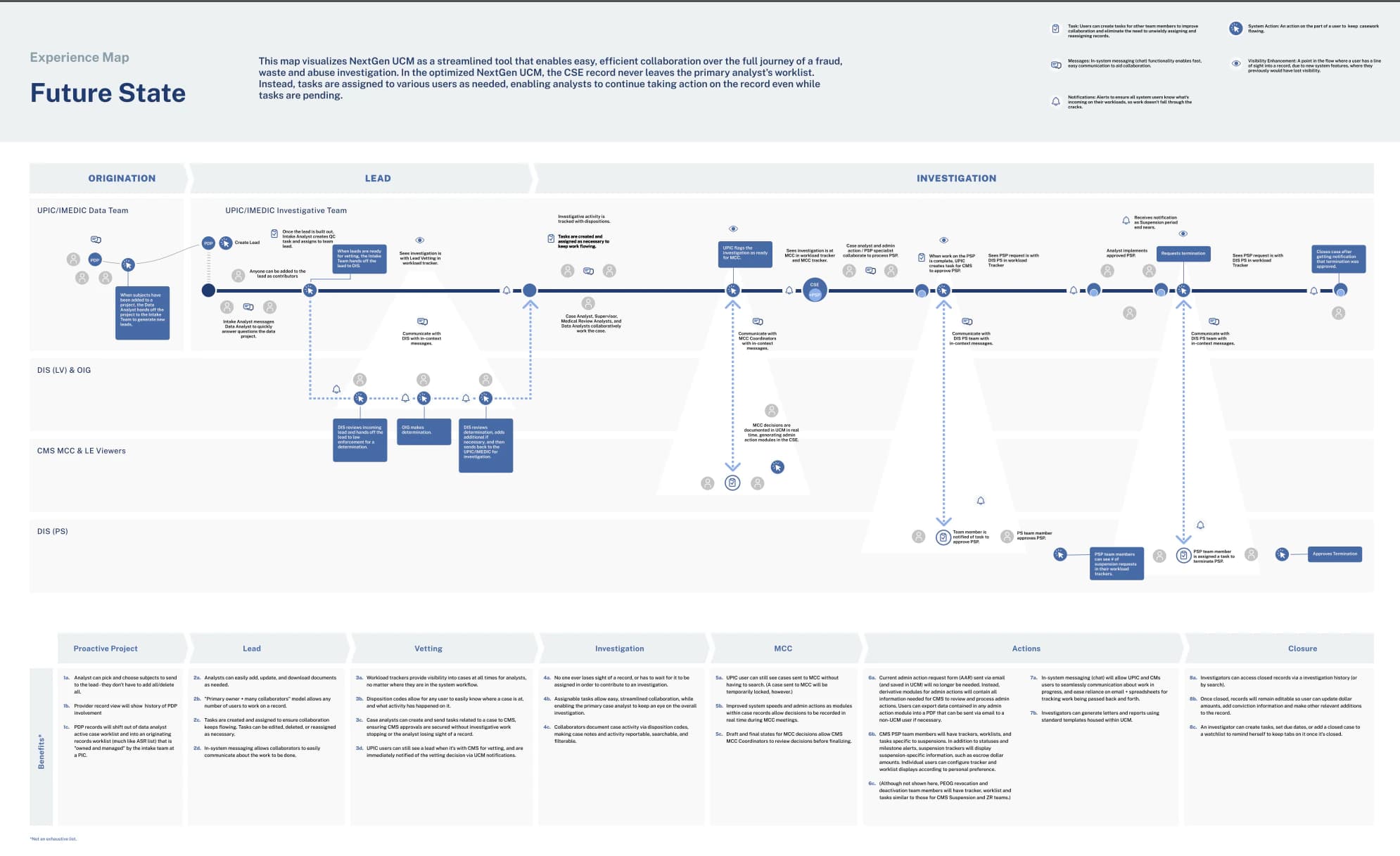
In the optimised UCM NextGen, the CSE record never leaves the primary analyst’s worklist.
Instead, tasks are assigned to people as needed, so analysts can keep acting on the record while tasks are pending.
Future-state experience map
The same kind of investigation, replayed in UCM NextGen.
What changes
Task, message and notification icons replace hand-offs by email.
Eye icons mark where someone now keeps sight of a record they would previously have lost.
Benefits are numbered by stage along the bottom, mirroring the current-state pains.
04Design
Designing across three subsystems
To build an intricate system part by part, the team split the product design into three subsystems around the major workflows.
Compromised Number Record
A beneficiary or user ID identified as used fraudulently or breached, with or without the owner’s knowledge.
Major Case Coordination
Regular collaboration between CMS’s Center for Program Integrity (CPI) and law-enforcement entities on the top cases in a jurisdiction.
Record Management
The pipelines for individual records spawned during an investigation.
Subsystem 01 · CNR
From screen flow to a usable record
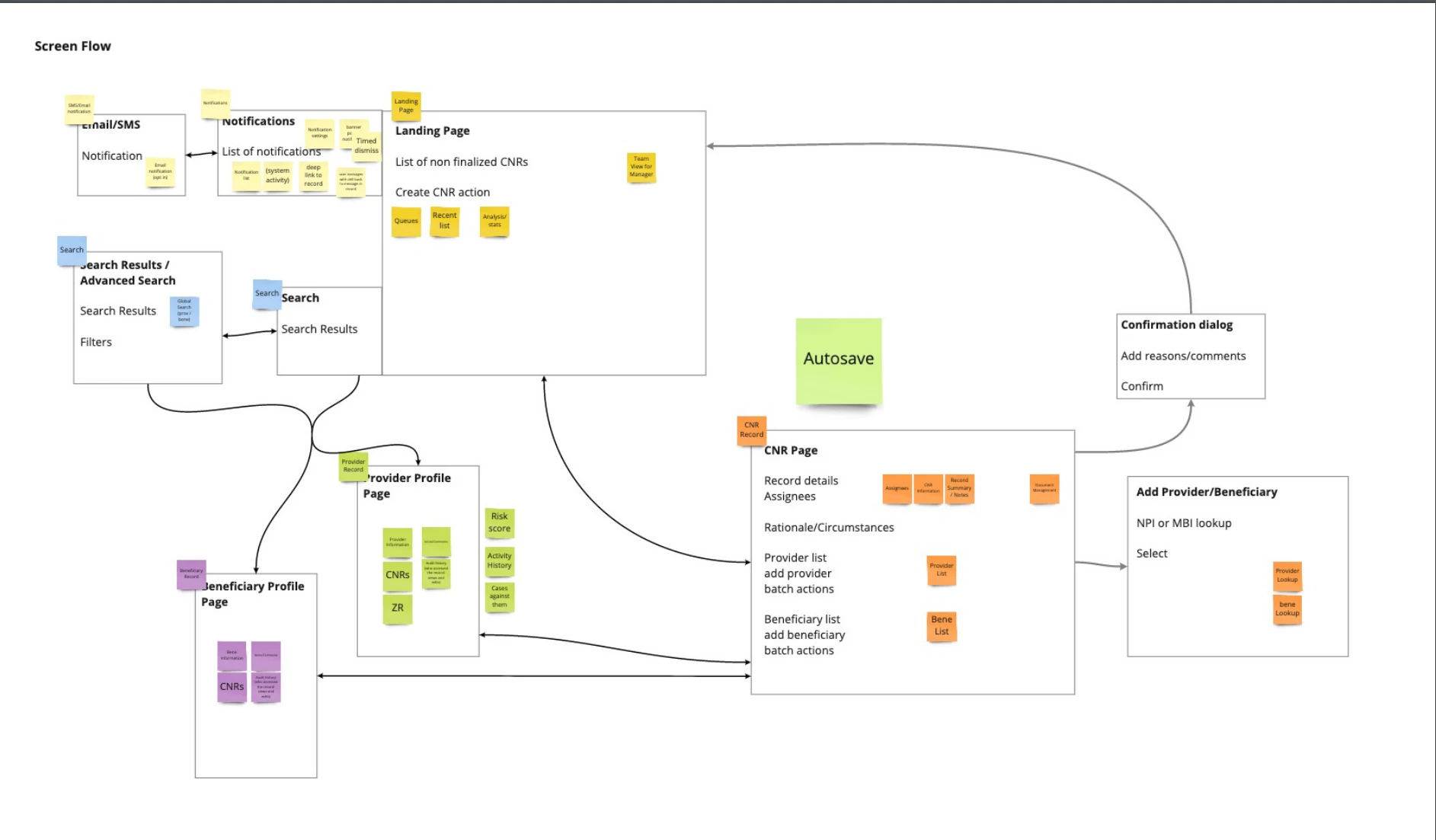
Over 16 weeks of weekly sprints, the design team took the Compromised Number Record from feature blocking and screen flows to high-fidelity design.
Launched · early 2021
Screen flow
Search, provider and beneficiary profiles, and lookup by provider number (NPI) or beneficiary identifier (MBI) all lead into the CNR page.
Wireframe → final record
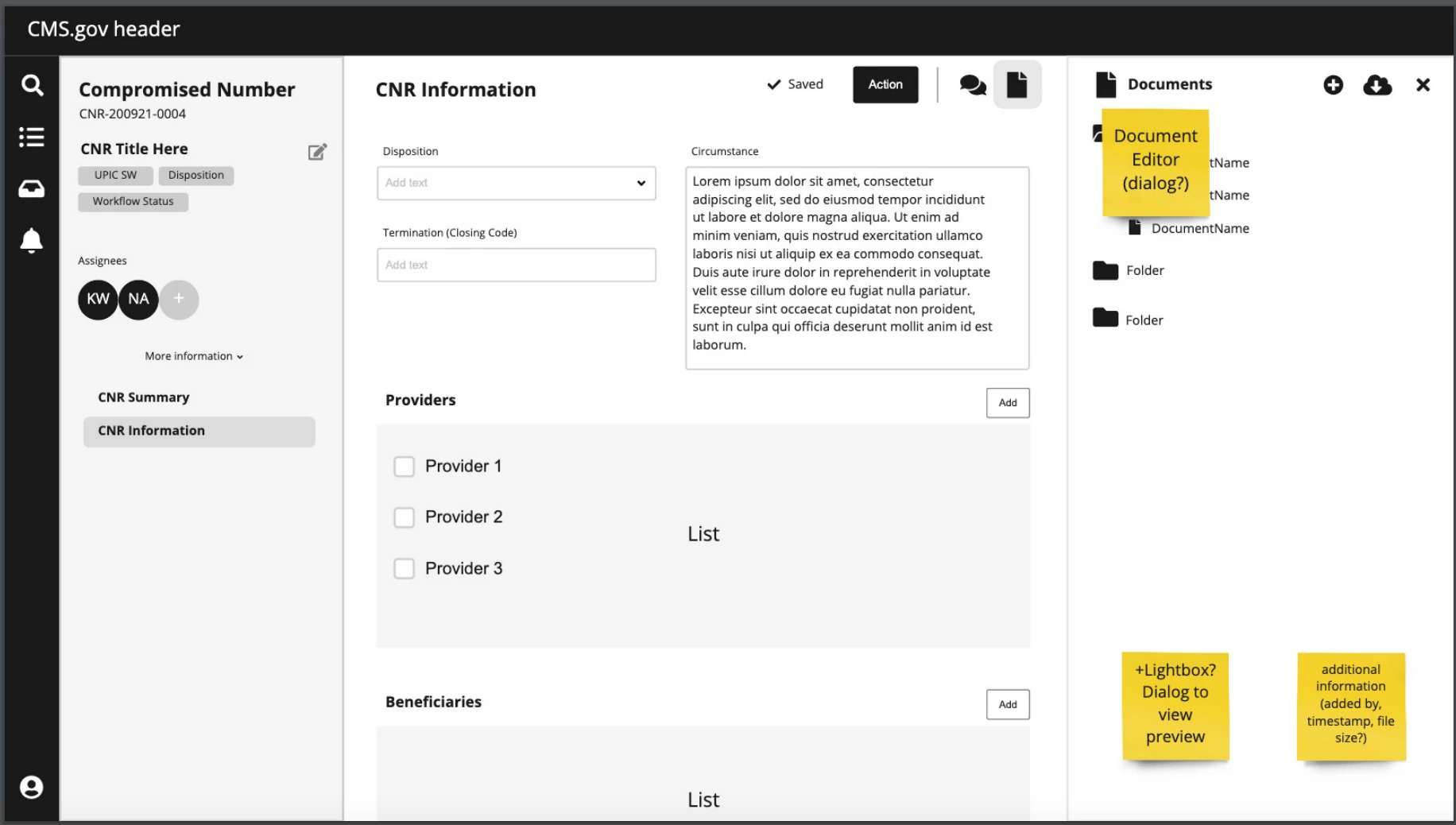
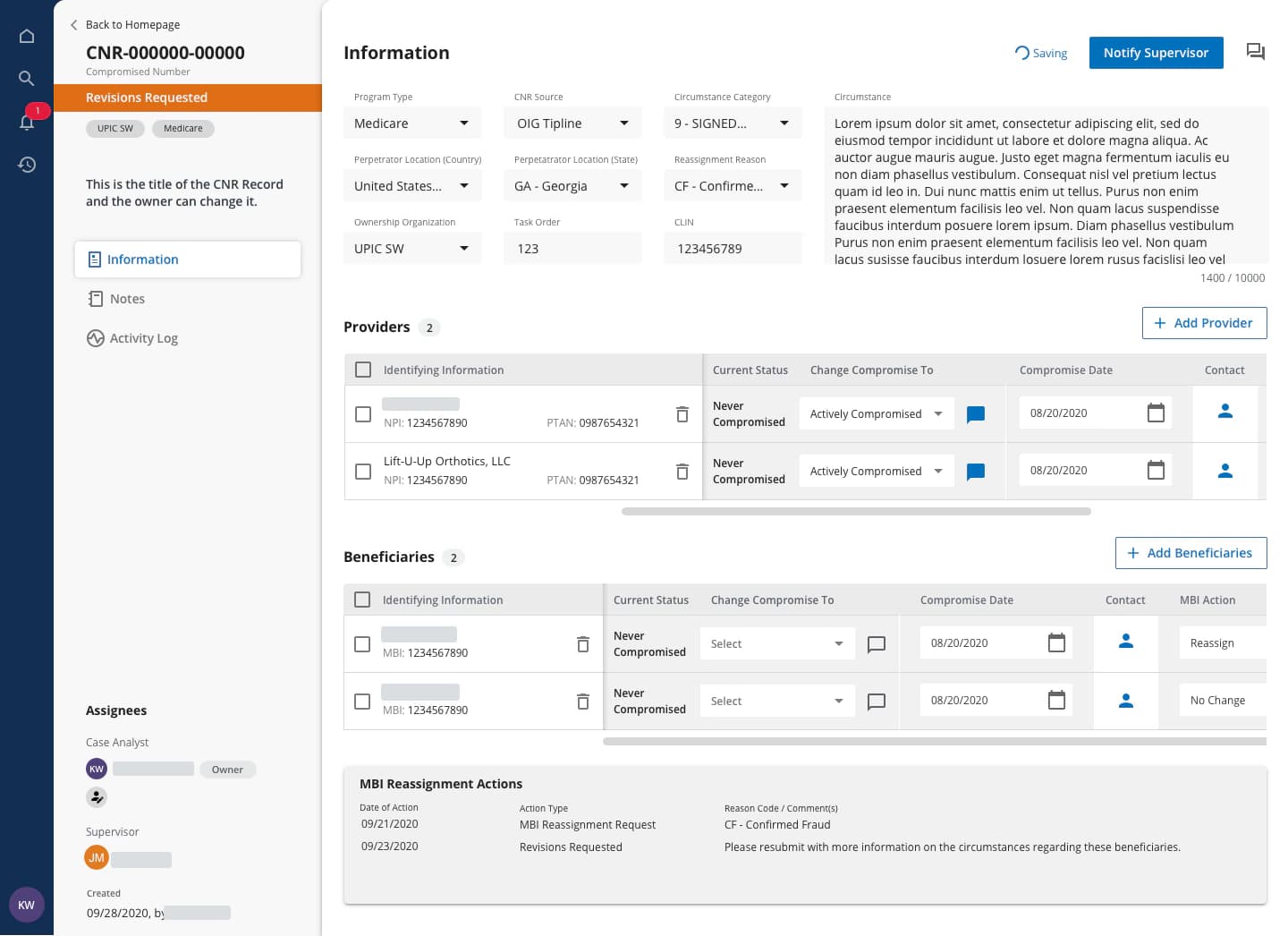
- A “Revisions Requested” banner sits under the record ID.
- Providers and beneficiaries gain identifiers, current status and a “Change Compromise To” control.
- “Action” becomes “Notify Supervisor”, beside a saving indicator.
Subsystem 02 · MCC
Coordinating the cases that matter most
MCC introduced jurisdiction-wise case trackers and analytics, pre-, in- and post-meeting admin actions, and a quick view of cases with their order for meetings.
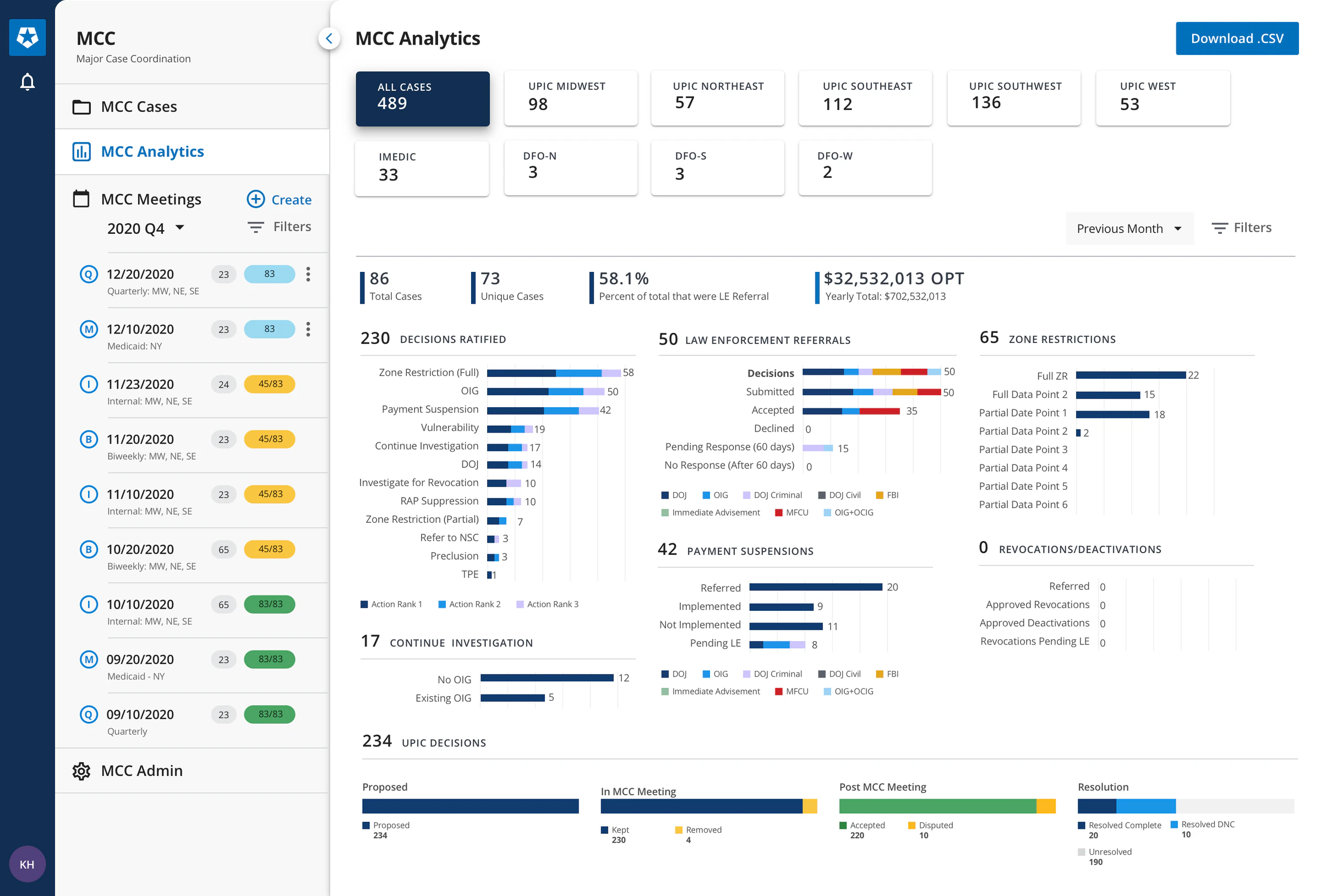
MCC Analytics
Jurisdiction-wise analytics — decisions ratified, law-enforcement referrals, zone restrictions and payment suspensions — beside the quarter’s meetings.
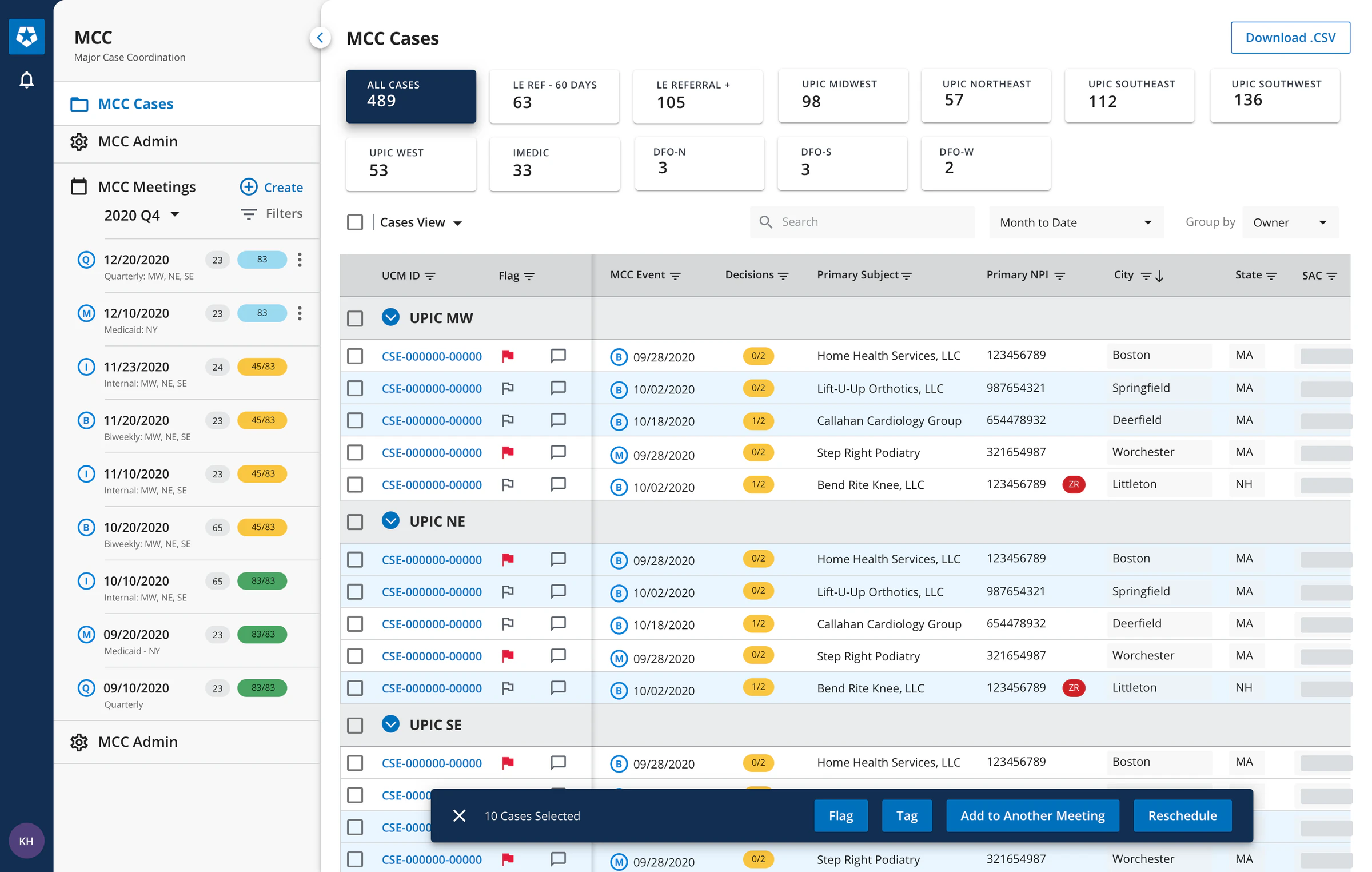
MCC Cases
The case tracker groups cases by jurisdiction, with flags, decisions and bulk actions to flag, tag, add to another meeting or reschedule.
My work
Quick-View Actions
A drawer for reviewing a case’s detail in context, without leaving the coordination meeting.
The challenge
MCC meetings review a jurisdiction’s top cases together. Before UCM NextGen, that review ran on spreadsheets shared by email, and decisions reached UCM only after later meetings confirmed them.
From the current-state map
- 7a · Pain
- “Most of the management and review of cases for MCC is done through spreadsheets shared through email.”
- 7e · Pain
- “Real-time documentation of MCC decisions in UCM isn’t possible.”
- 7g · Need
- “A shared view of the cases to be presented at MCC.”
My responsibility
I was responsible for designing the Quick-View Actions drawer for its various functions and states across the meeting lifecycle.
States named in the source; the screens shown don’t distinguish them.
The approach
Review in context. The drawer opens over the right of the meeting’s case list, which stays in view, so any case can be reviewed without navigating away from the meeting.
Design decisions visible in the screens
- As in the opening screen, the drawer covers only the right of the page; the meeting’s ordered case list remains beside it.
- Case ID, flag, tags, primary subject and payment figures, with Add to MCC, stay above every tab.
- Summary, Case Info, Financials, Actions, Decisions and Messages divide the case into focused tabs.
Two views of one case
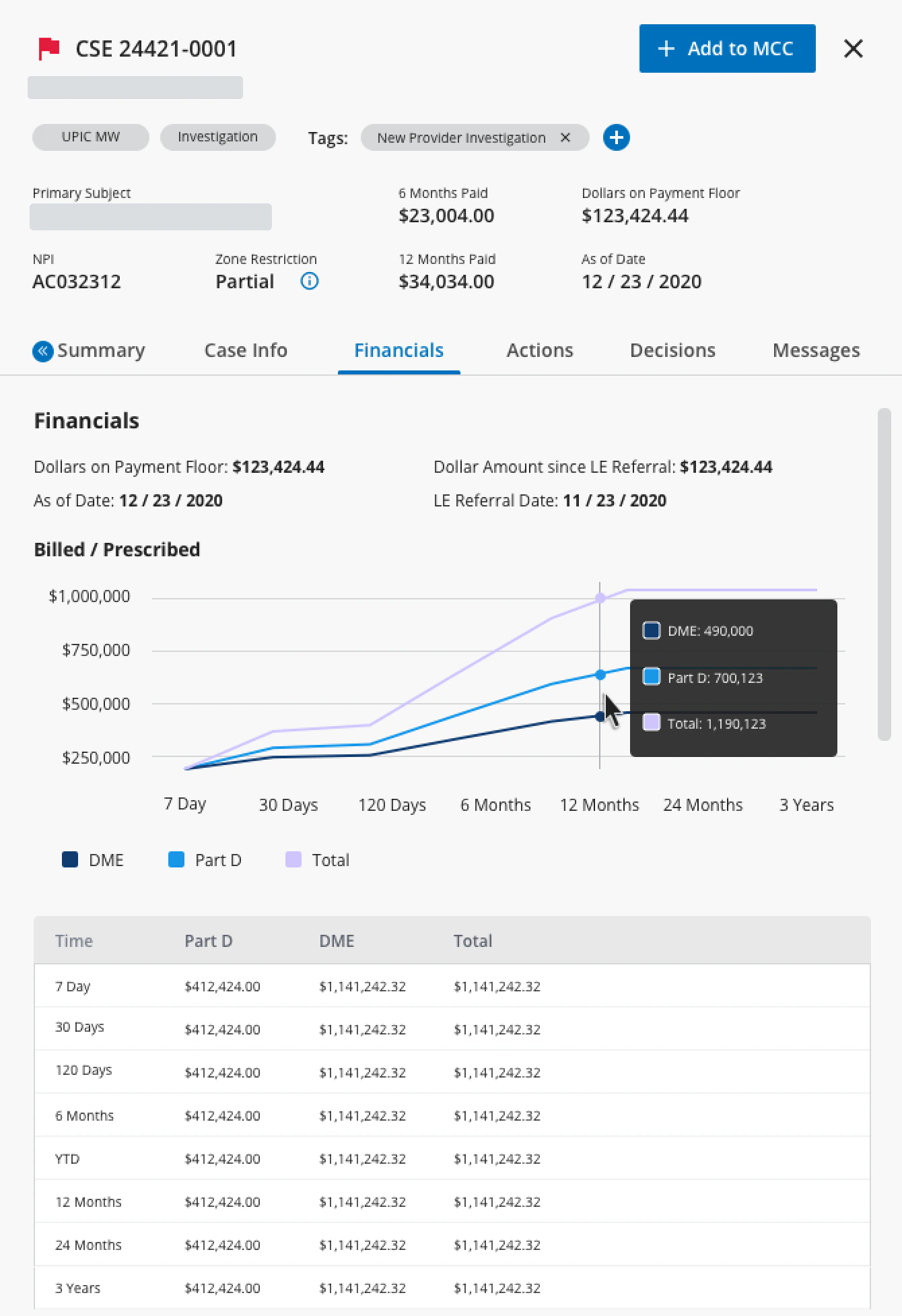
Financials
Headline figures — dollars on the payment floor and the amount since law-enforcement referral — sit above a billed and prescribed chart from 7 days to 3 years, with the same values as a table.
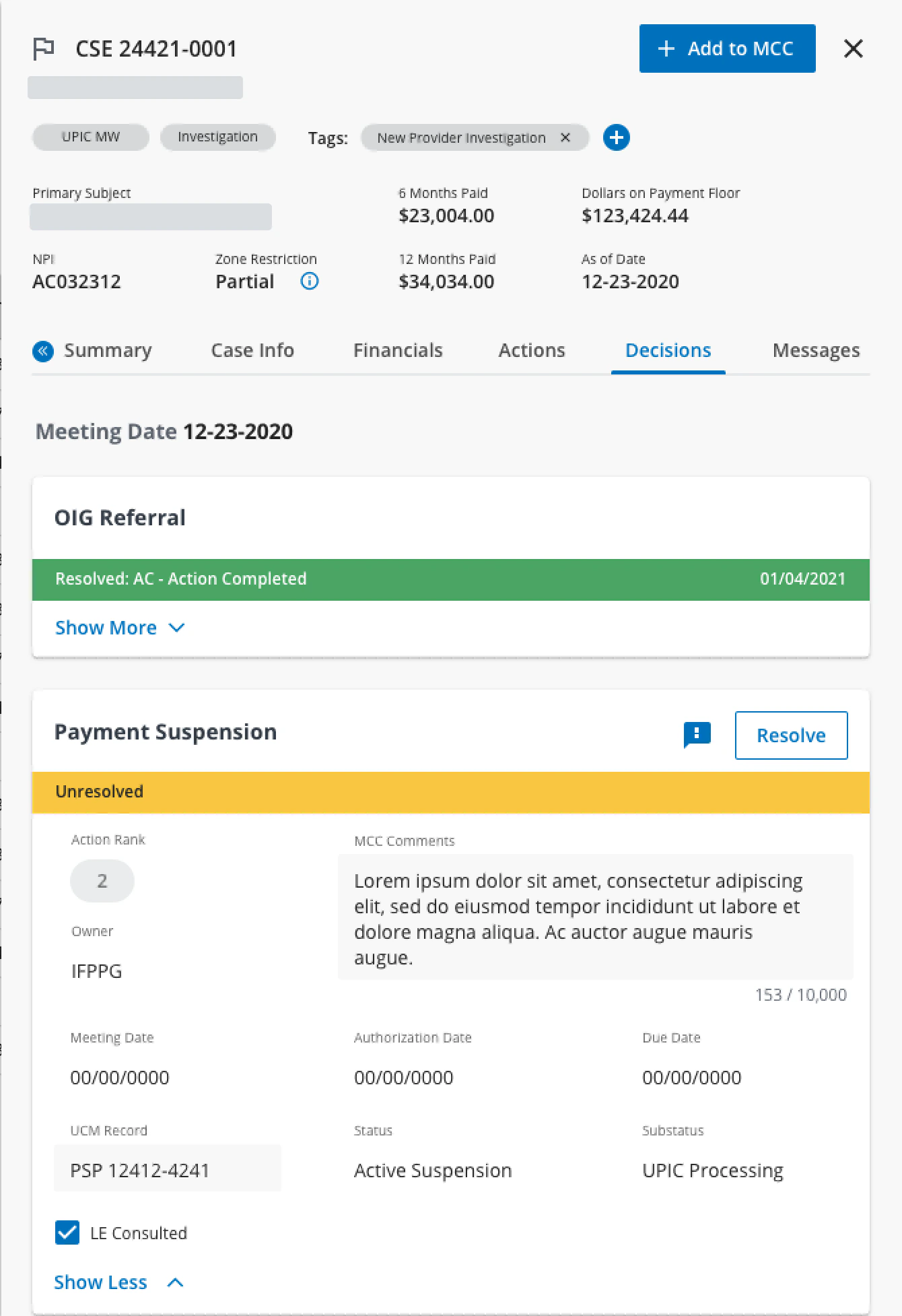
Decisions
Each decision for the meeting is a card with a coloured status bar. The resolved one is collapsed to its outcome and date; the unresolved one is expanded, with action rank, owner, MCC comments, dates and a Resolve action.
Financials and Decisions are two of roughly ten drawer functions described in the source. No usage, time or error results were reported for the drawer.
Subsystem 03 · Record Management
One record type in depth: Postpay Review
The third subsystem covered the records spawned from a case. The original case study shows one in depth: the Postpay Review (PPR).
In design · 2021
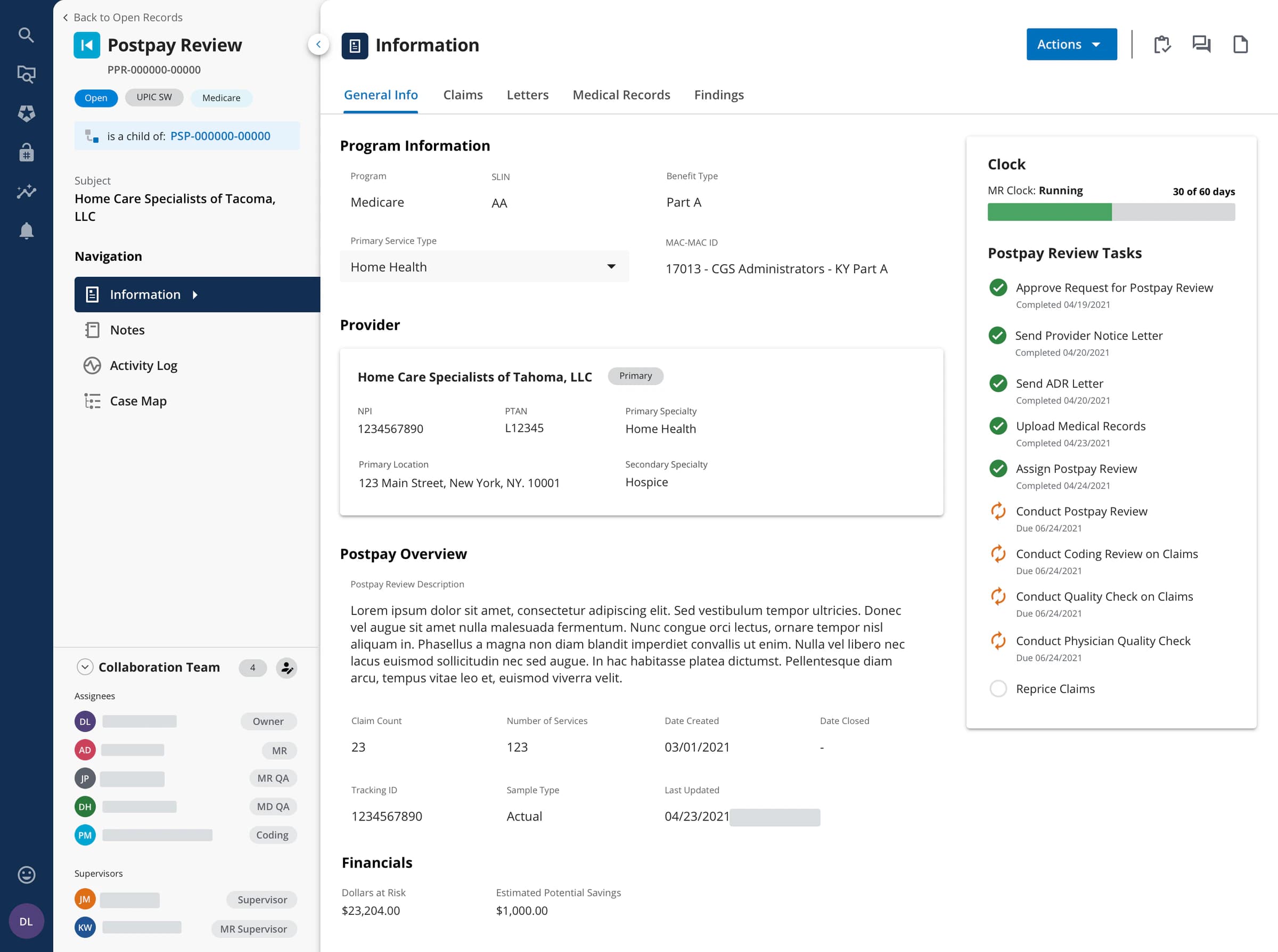
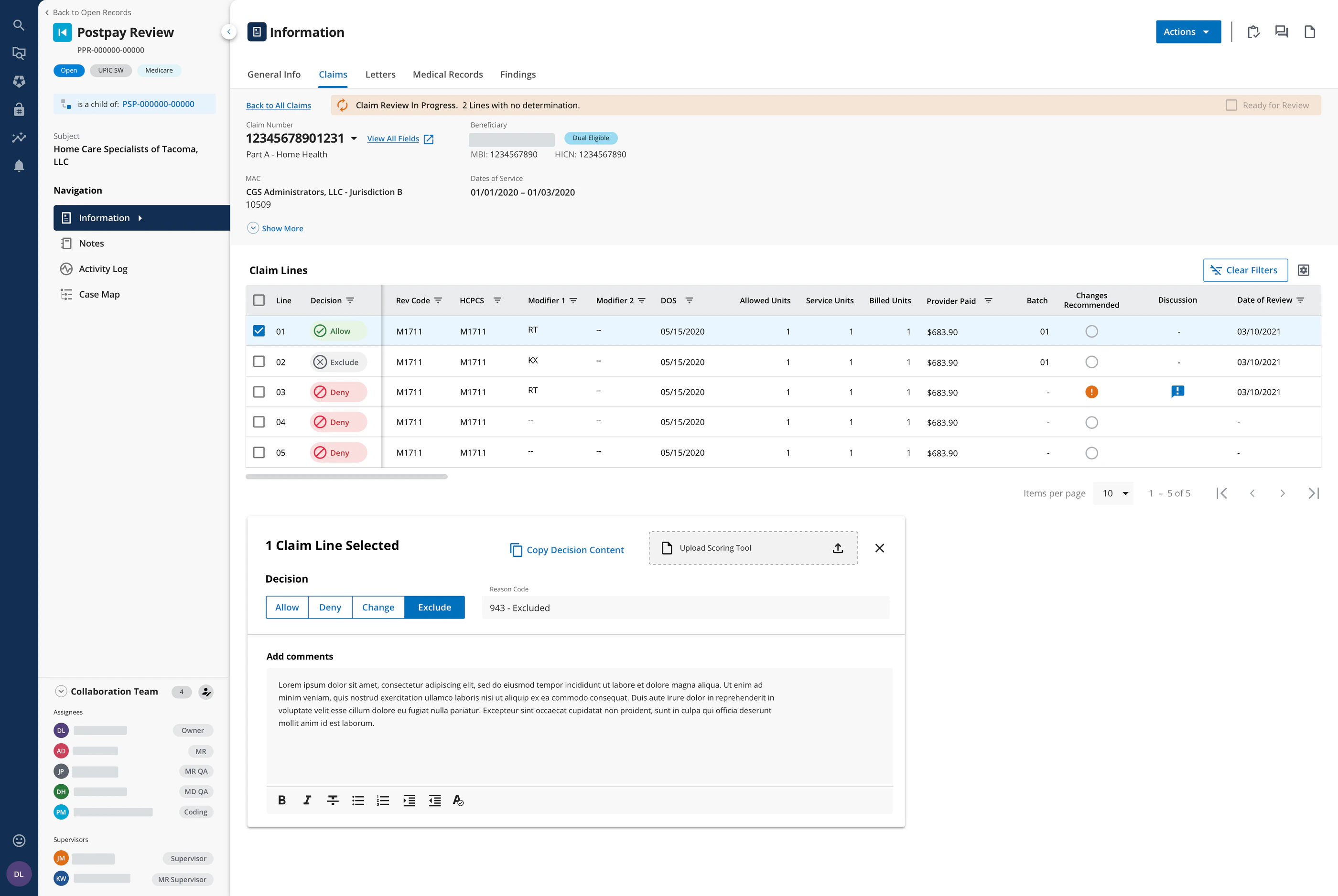
- Each PPR names the record it is a child of — here a payment suspension — tying it back into the case.
- Each claim line takes an Allow, Deny, Change or Exclude decision, with a reason code and comments.
05Delivery
Where the work stood in 2021
UCM NextGen was built in an agile environment, with launched pipelines improved through feedback loops with end users.
CNR
Launched
Live; launched in early 2021.
MCC
In testing
Development completed; testing underway.
Record Management
In design
Deep in the design phase with stakeholders.
06Reflection
Design how information moves, not only the screens
On a product this large, the hardest problems sat between the screens — in hand-offs, queues and spreadsheets. Tracing one record across people showed where context was lost, and designing the Quick-View drawer meant bringing that context to where decisions are made.
“This large scale product has definitely helped me evolve as a designer.”